
Table of Contents
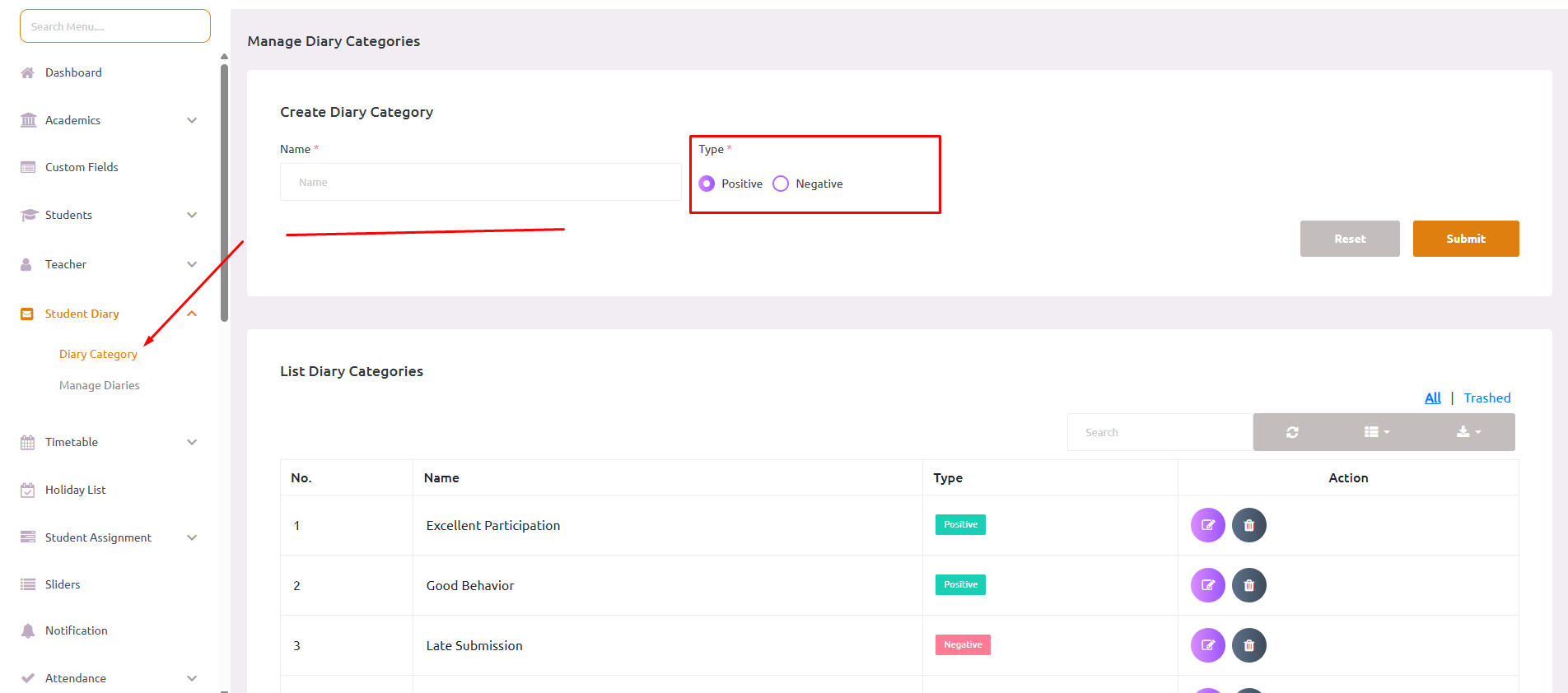
Before creating diary entries, you must first set up diary categories in the admin panel. Categories help organize diary entries and can be marked as positive or negative.
Step1:- Navigate to the Diary Category section in the admin panel
Step 2: –Click on Add New Category button
Step 3:- Fill in the following details:
- Category Name – Enter a descriptive name (e.g., “Homework”, “Behavior”, “Achievement”, “Attendance”)
- Category Type – Select either:
- Positive – For encouraging notes (achievements, good behavior, completed work)
- Negative – For areas of concern (missed homework, behavior issues)
Step 4:- Click Save to create the category
Category Examples #
Positive Categories:
- 🌟 Outstanding Performance
- 👍 Good Behavior
- ✅ Homework Completed
- 🏆 Extra Curricular Achievement
- 📈 Improved Performance
Negative Categories:
- ⚠️ Homework Not Submitted
- 🚫 Behavioral Issues
- 📅 Attendance Concern
- ❌ Incomplete Assignment
- 📊 Needs Improvement


