
Table of Contents
Create and manage your school’s fleet of vehicles with detailed information.
How to Create a Vehicle: #
- Navigate to Transportations > Vehicles from the sidebar menu
- Click on the Create Vehicle section
- Fill in the required details:
- Name: Enter a unique name for the vehicle (e.g., “Vehicle 1”)
- Vehicle Number: Enter the registration/license plate number (e.g., “UP32XXXXXX”)
- Vehicle Capacity: Specify the maximum number of passengers
- Status: Select Active or Inactive
- Click Submit to save the vehicle
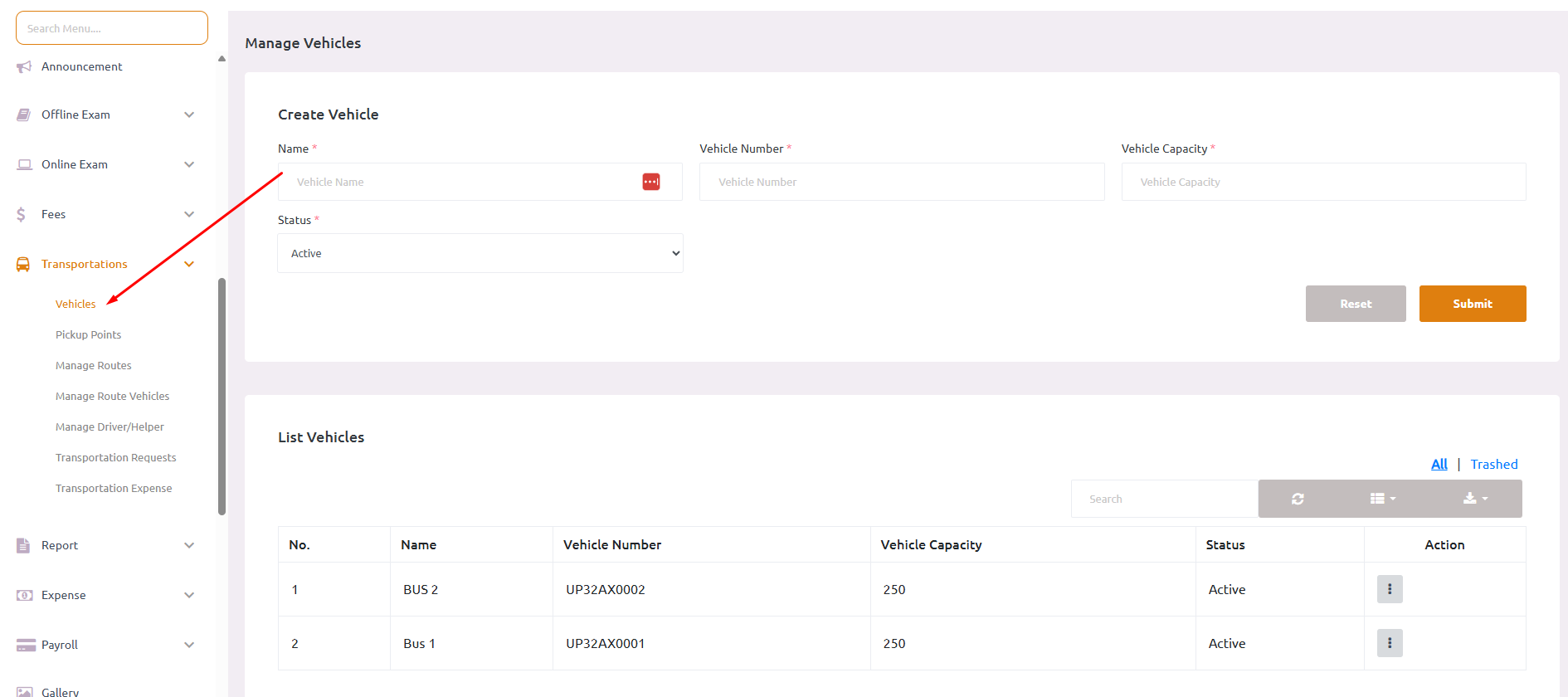
Vehicle List Features: #
- 📋 View all vehicles in a comprehensive table
- 🔍 Search and filter vehicles
- ✏️ Edit or delete existing vehicles
- 👁️ View vehicle status at a glance
- 📊 Track vehicle capacity and availability